A payment date passes without anyone recording it, and the next time you open the loan, something has clearly changed color. Here is exactly what happened and what to do about it.
What overdue actually means here
A scheduled payment becomes overdue the moment its due date is in the past and nobody has recorded it as paid yet. That is the whole rule. Family Loan Tracker does not add a late fee and does not change the interest rate because a payment is late. The amount due for that period stays exactly what it always was, the same figure you would see on the loan dashboard on any other day. What does keep moving is interest, covered below.
What you will see
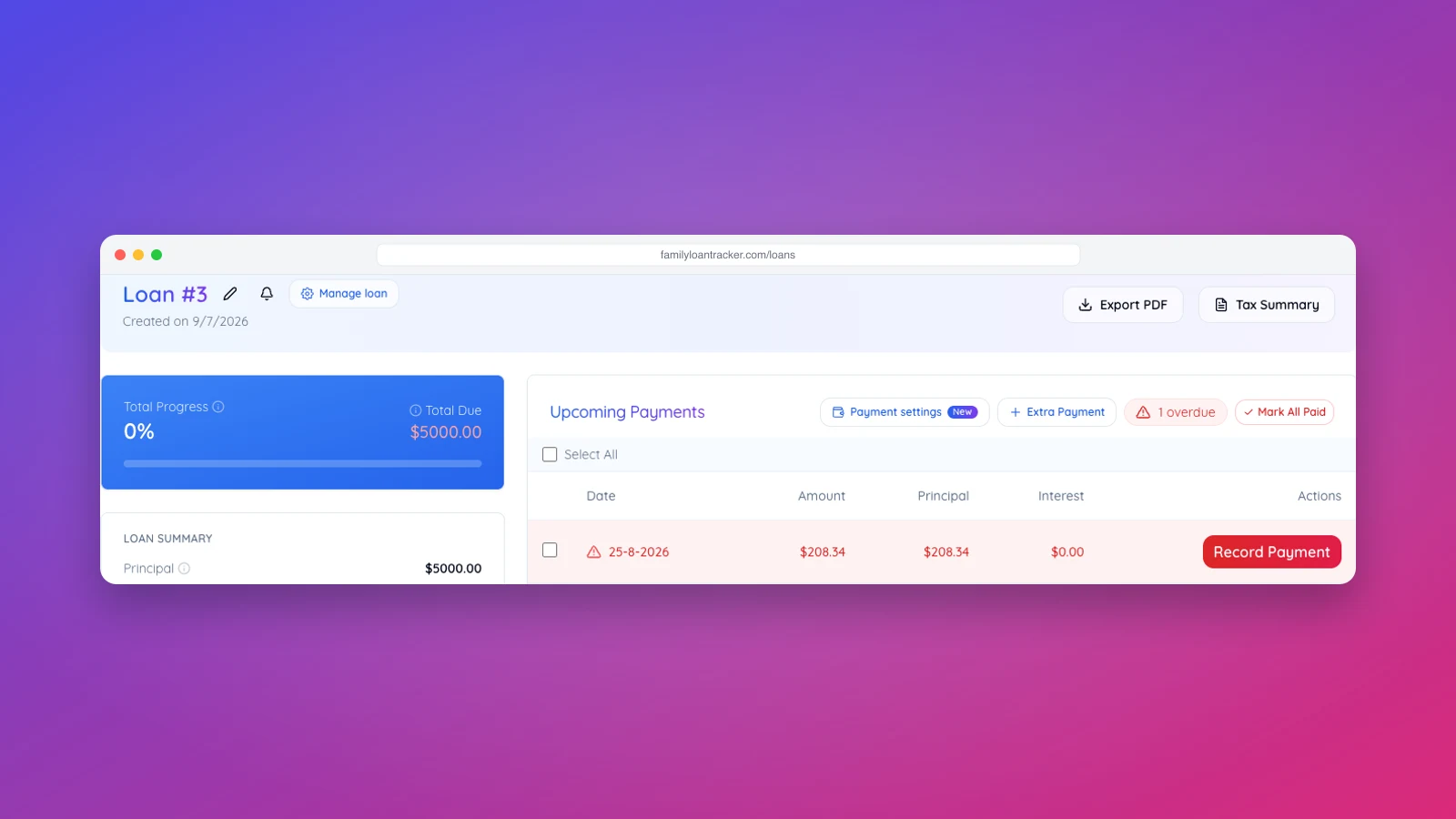
The periodic payment card turns red, and the total due figure does too. In Upcoming Payments, the overdue row is highlighted, marked with a warning icon, and its Record Payment button turns red. A small badge next to the table header counts how many payments are overdue, with a Mark All Paid button beside it.
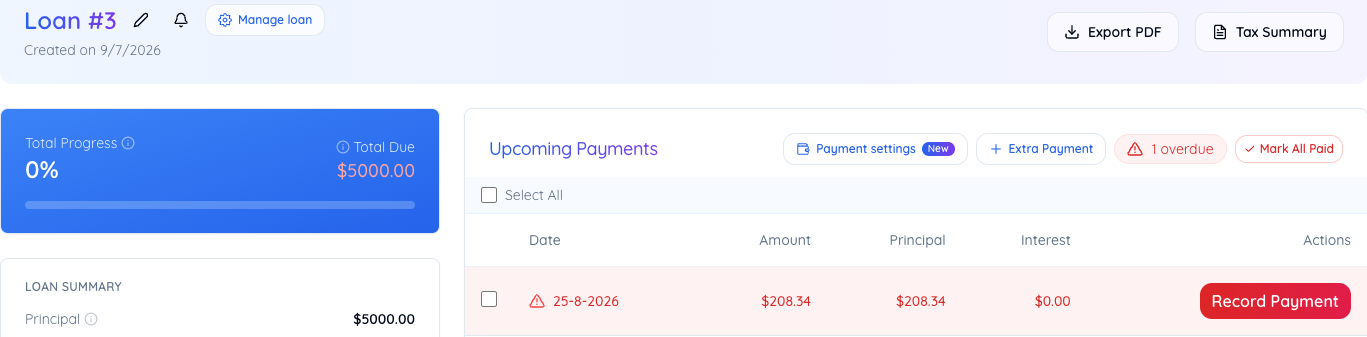
What happens to interest while it stays overdue
A missed payment does not pause interest. Each overdue period still charges interest on the balance that was not paid down, so two missed months on a $250,000 loan at 2% each add $416.67 of interest, the same amount both times, because the balance never moved. That interest is owed on top of the principal but is not added to it, so a missed month never charges interest on interest.
You will see this in two places. The Total Due figure on the progress card grows by one period of interest for every missed period, with a line underneath showing how much of it is accrued interest. And in the payment schedule, every overdue row shows interest calculated on the true balance rather than on the balance it would have had if the payment had been made. The installment itself does not change: catching up means paying exactly the missed installments, no penalty. The rows further down remain a projection that assumes you do catch up, so the loan still ends on its agreed date.
Clearing it
Record the payment the same way you would any other, backdated if the money actually moved on the original due date. The moment it is recorded, the row returns to normal, the red styling disappears and the accrued interest line goes with it, because overdue is calculated fresh every time the page loads, not stored as a flag that lingers after the fact.
If several payments piled up, for a loan you are catching up on after a gap, say, Mark All Paid records every currently overdue payment at once instead of one at a time. Use it once you are confident all of them were actually received; it does not ask you to confirm each one individually.
If the payment was never actually made
Overdue is not the same as forgiven. If a family loan payment is genuinely missed rather than just unrecorded, leave it overdue rather than marking it paid to make the color go away. The balance and total interest figures stay accurate for as long as the payment sits unrecorded, which is exactly the record you want if the two of you need to talk about what happens next. Our guide on what to do when a family member stops paying covers that conversation and the options beyond just waiting.