This guide explains every number on your loan's dashboard in Family Loan Tracker — what it measures, how it's calculated, and what to do when one of them looks off.
Once a loan is set up, the dashboard becomes the single place both the lender and the borrower check to see where things stand. The numbers are designed to answer one question at a glance: is this loan on track? Here's how to read each piece.
The periodic payment amount
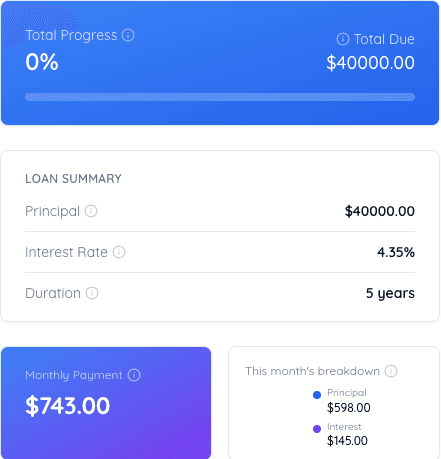
This is the amount due each payment period, based on the loan's principal, interest rate, duration, and payment frequency. For a fixed-rate loan, this number stays the same for the life of the loan unless an extra payment changes the remaining schedule.
If you see this number change partway through a loan, it usually means an extra payment was logged and the schedule recalculated — not an error. It can also change if the loan's rate, amount, or duration was corrected through Manage loan.
Total interest
Total interest is the sum of all interest the borrower will pay over the full life of the loan, assuming payments are made on schedule. It's calculated up front from the loan terms, then revised any time the schedule changes.
For example, a $20,000 loan at 4% over 5 years with monthly payments has a total interest figure of a little under $2,100. That number drops every time an extra payment reduces the principal early, because less balance is outstanding to accrue interest against.
Paid principal and paid interest
These two cards track what has actually happened so far, as opposed to what's projected. Paid principal is the portion of all payments made to date that went toward reducing the loan balance. Paid interest is the portion that went toward interest cost.
Early in a loan's life, paid interest typically makes up a larger share of each payment than paid principal — this is normal amortization behavior, not a sign of bad terms. As the loan matures, the split shifts toward principal.
When a payment is overdue
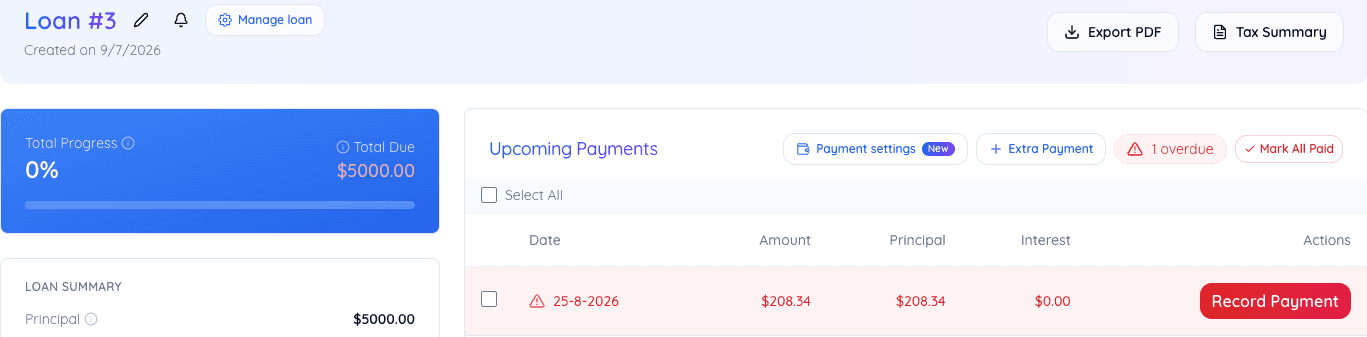
There is no separate overdue card. Instead, the periodic payment amount above and the total due figure both turn red, and Upcoming Payments gets a small badge counting how many payments are overdue, next to a Mark All Paid button. The specific overdue row is highlighted, with its own Record Payment button turned red, so it is hard to miss without adding a card that clutters the dashboard on every loan that does not need it.
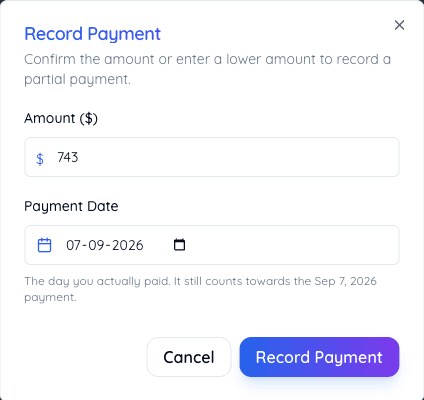
If you have made a payment outside the app, cash, a bank transfer not yet recorded, but the dashboard still shows it as overdue, record the payment to clear it. The dashboard reflects what has been logged, not what has happened in real life until you log it. See how to handle overdue payments for exactly what does and does not change when this happens.
The progress card
The progress card shows what percentage of the total loan has been repaid, measured by principal paid against original principal — not by the number of payments made. A loan that's 50% through its term by time but has received several extra payments may already show well over 50% progress.
This distinction matters because it's principal, not time, that determines when the loan is actually finished.
Reading the cards together
The dashboard is most useful read as a set rather than card by card. A loan with a steadily climbing paid-principal figure, no overdue amount, and a progress bar tracking close to the time elapsed is behaving exactly as planned. A loan with a growing overdue figure next to a progress bar that's lagging behind the elapsed term is the clearest early signal that a conversation with the other party is overdue too — before the gap widens. Our guide on common family loan mistakes covers how an ignored dashboard pattern like this one tends to play out if it isn't addressed early.